
 There’s no such thing, is there? Well, I keep looking, regardless. Ten years ago, I bought my first PDA, the Pilot 5000. I saw it in an Egghead catalog and got on the waiting list here locally. It fit my needs wonderfully and simplified my life. Gone were the multiple paper and computer calendars. Instead, I could have a single computer calendar and my Pilot would sync to it.
Over the years, I had probably 15 different PDAs, each one faster and more capable than the prior. But I still felt limited by the devices themselves. In December 2004, Sony finally released in the US a computer that they had released sometime earlier in Japan. 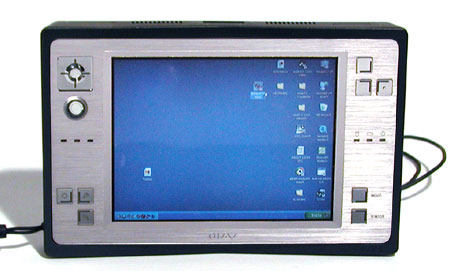 The device ran Windows XP. Having a fully functioning computer in the palm of my hand was exactly what I had wanted all those years. I got one of the only 500 (some say 250) that were sold in the US market.
The Sony U750P is quite a device. It has a 5″ screen and weighs 1.2 lbs. I actually have some photos (somewhere) comparing the size of the device to a PDA. This review gives more more detail on the computer. I was quite happy with it, even though it was a bit larger than my PDA (and significantly heavier). From the time I got it, my PDA (a Palm T3) has sat on my desk, collecting dust. I carried my U (nicknamed Precious) everywhere.
That is, until I got my Lifebook last August. (See this review for details on the unit.) A lot of the folks who own the Sony U-series had put Tablet PC on the units. I had been itching to try TPC but the price for the software ($700 last time I checked) was outrageous. Plus, as much as I like tweaking computers, I have never done an operating system installation and was unwilling to screw it up and end up with a $2,000 paperweight.

So I held off until I could find a Tablet that was small enough and powerful enough, with a reasonable sized hard drive. Enter the Fujitsu Lifebook 1510D.
The photo on the left gives you some sense of the relative size of the Lifeboo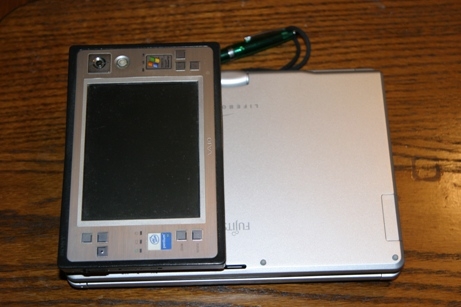 k (middle) as compared to my fullsize Sony PCG-K27 laptop on the bottom and Precious on the top. As shown on the right, Precious, without the carrying case, is about half the size of the Lifebook. Unfortunately, with the carrying case and large capacity battery,
  Precious is actually thicker than the Lifebook, which requires no case. But that’s not why it has become my computer of choice.
The larger screen (8.9 inches as opposed to 5) has been absolutely perfect for me. Not only is it easier on the eyes, it gives me more screen real estate for taking handwritten notes. Having a built-in microphone has been more useful to me than I could have imagined. I can record an event and take notes unobtrusively (some would say incognito 🙂 ), making my life a lot easier in the process. 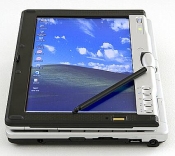 The larger hard drive (40 gig versus 20 gig) means that I am not constantly juggling what software I have on the computer or carrying an external harddrive. The Lifebook is a convertible
 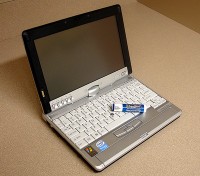 TPC, so when I need a keyboard, it’s already there. And while the keyboard is small, it is quite comfortable to me.
But even the Lifebook isn’t perfect. The WiFi in Precious is stronger, meaning I have to be closer to the source than I used to have to be. And the Lifebook requires me to configure each WiFi connection, while Precious did that automatically. Interestingly enough, no virus protection software came with the Lifebook, while Precious included a 60-day trial of Norton. Also missing from the Lifebook was a DVD decoder, which I found quite surprising. Even though neither the Lifebook nor Precious have a built-in DVD, I have an external one and had to buy a DVD decoder.
Both devices lack built-in Bluetooth, but since I already had a BT CF card, that wasn’t an issue. (The Lifebook was available with BT but I was advised against getting it with it built-in because of the stack it used.) Also missing from both devices is a PCMCIA slot, which means my internet surfing (when WiFi is not available) is limited to the much slower GPRS than EDGE.
So the search for the perfect sub-notebook computer continues. In the meantime, I’ve got two great devices that have served me quite well.
 VIVIAN J. PAIGE | All Politics is Local
And the dorkometer shoots through the roof. I’m quite impressed.
Until I joined the Cult of Steve, I was a devotee of IBM’s x-series of laptops. If I were going to buy a new non-Apple laptop, I’d probably look hard at the Lenovo X60 Tablet.
The issue for me is size. I want something small enough to carry all the time. That’s why I stuck with PDAs so long. The Lifebook I have has, of course, already been replaced with a newer model but the features are very similar. IBM’s computers (like Sony’s) are generally more expensive than other similarly equipped devices.
Apple has never appealed to me. Lots on my geek friends tried to convince me to get a PowerBook when I bought my large laptop. But I need to be able to run software that only exists for the PC (industry-specific stuff) and the software that allowed PC programs to run on Apple stuff was slow and buggy. Of course, with the dual boot Apples now on the market, I may have to take another look – when I’m back in the market for another computer, which won’t be anytime soon.
Oh, my god, you are a geek! I knew you were awesome but I my admiration just went up ten-fold upon reading this post. You are way cool Vivian.
Hey, you’re the one using a Tablet to draw. I may be a geek but you have artistic talent 😉
Aw shucks, that is mighty kind of you to say Vivian.
Forgot before… I three Palm devices sitting around in draws gathering dust (one unopened in a box). I ditched my last Palm V when I got a Blackberry. Then I ditched the Blackberry… Now I have an old fashioned day planner that I am trying to use… Although I might break down and replace my Razr with one of the Treos some day soon… they are pretty cool.
I’ve toyed with getting a Blackberry – just never made the leap. I use a Razr, too. The Treo is just too bulky for me – and except for the latest Blackberry (Pearl) they are all bulky, too. I’ve been warned away from the Pearl; otherwise, I’d have it by now 😉
Vivian, for a cell you may want to look at the recent Cingular 3125. It has a Windows OS in a RAZR sized clamshell form factor. You can read and send email, surf the web, play music, etc. in addition to all the standard cellular features. It’s pretty cool.
Barry – that’s a no-go for me. My service is with T-Mobile and I really dislike Windows Mobile as an operating system.