
 One of the most interesting parts of my day in Richmond yesterday was a briefing on how to negotiate the Legislative Information System when trying to track the budget. (Click on image to enlarge.) I didn’t realize that LIS had so much information on the budget bills and amendments on the site. For the most part, I had only looked at the budget information offered by the Department of Planning and Budget. The LIS is much, much better.
Once you click on the State Budget link, you are brought to a page from which you can navigate to a number of items.
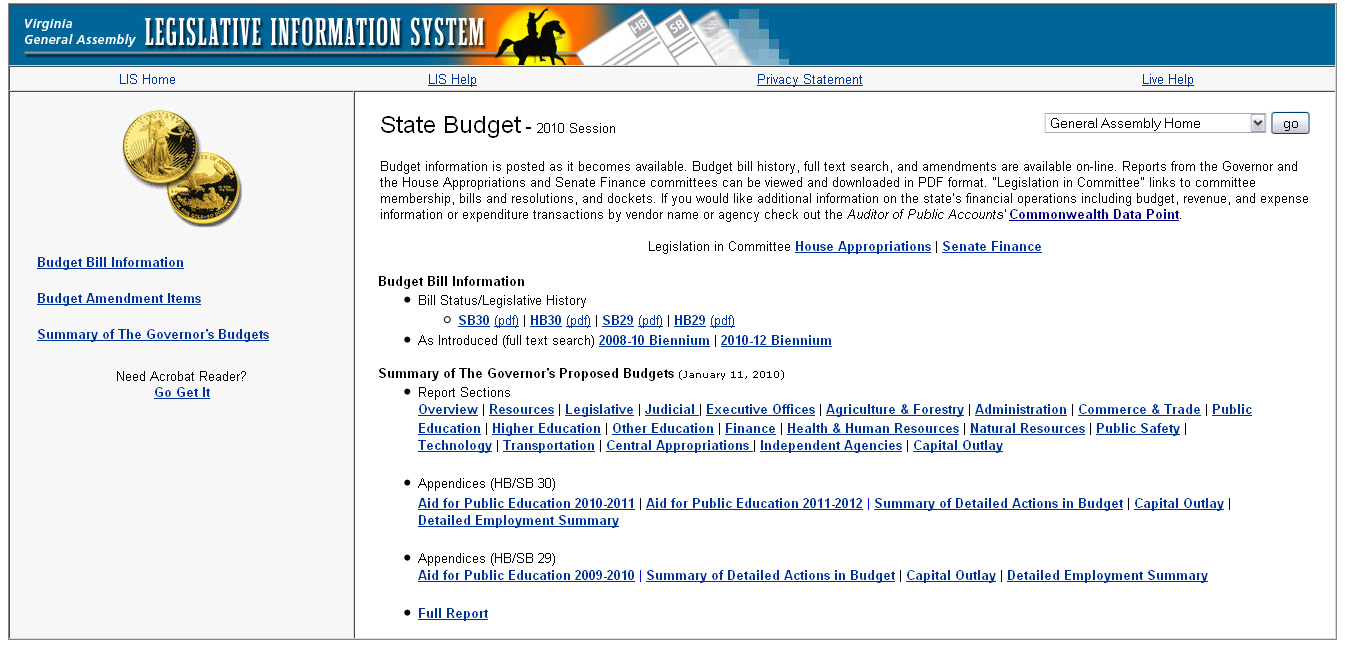
On the left is the main navigation panel. The first item, Budget Bill Information, is what is shown on the right side. Included here are links to the bills along with the summaries, written by staff, which translate the arcane language of the budget into relatively plain English. Note that the bills numbered 29 are the caboose bills for the prior biennium while the bills number 30 are for the next biennium.
Note that all of these documents are in Adobe Acrobat (pdf) format so you need that reader installed on your computer.
One thing that is not on this page: the entire budget. There is a full text-search of it available.
The second item on the left is Budget Amendment Items. Clicking on that will bring up a page that allows you to look at the budget amendments that have been requested by various members of the legislature. Clicking on the member’s name will bring up the budget line item(s) as well as the change. And then clicking on the line number will bring up the actual change. In the upper right hand corner is a link to the budget section as originally proposed.


The money committees in each chamber – Appropriations in the House, Finance in the Senate – approve the budget amendments and those will show up on the Budget Amendment Items page under “Committee Approved.” (As shown on the 2008 page here.) Floor amendments can also be approved. Those follow the item numbers of the original budget. Finally, there is a conference report. The final bill, as approved by the legislature, ends up being a House bill, as the Senate bill is rolled in.
This year, the week of February 21 – 25 is known as “Budget Week.” The committees responsible for the budget bills must complete their work by midnight on Sunday, the 21st. By noon on Tuesday, the 23rd, the amendments approved by the committees are to be available. Thursday, February 25 is Budget Day in the legislature and both chambers are to complete their work on the budget. The conferees then get to work and are to be finished by midnight on March 9th. The vote for passage of the budget takes place by the end of session, which is Saturday, March 13th.
Until this presentation yesterday, I had no idea that the average citizen could really follow the budget process like this. Kudos to the folks at the Division of Legislative Services for providing such information. Not only that, but I understand that the budget for this department has remained the same since 1988! Talk about efficiency!
Thanks to the presenters from the Division of Legislative Automated Systems – Jay Landis and Diane Seaborn – for an awesome job. As much as I love Richmond Sunlight for bill tracking, knowing that I can track the budget this way makes me give LIS another whole look. Wonder what else is over there that I’ve missed?
 VIVIAN J. PAIGE | All Politics is Local
It should be interesting to watch. A 4 billion plus hole to close with just spending cuts and they don’t want to touch education, public safety or services to seniors. Good luck with that GA members!
I’m so glad that you explained this! I’ve emphasized on the Richmond Sunlight blog and in the last newsletter that the budget is a whole subuniverse of legislation, something that is technologically infeasible to incorporate into my site. (The legislature’s website doesn’t allow the syndication of budget data.) But I’d really like to find other ways to remind people of this—pointing them to your blog would be a good start. 🙂
Glad to help!
A lot to take in, but neat stuff, Vivian.
Tex, add to your list of road blocks to successful budgeting, the needed funding to fix the transportation crisis they say we’re in.